HW04: Programming in R
Overview
Due by 11:59 pm on Friday, October 28th Saturday, October
29th.
The goal of this assignment is to practice basic R programming skills (control structures and functions).
Accessing the hw04 repository
- Go at this link to accept
and create your private
hw4repository on GitHub. Once you do so, your repository will be built in a few seconds. It follows the naming conventionhw4-<USERNAME> - Once the your repository has been created, click on the link you see, which will take you to your repository.
- Finally, clone the repository to your computer (or R workbench) following the process below.
Cloning your hw04 repository
After you have accessed the hw04 repository (see above), follow the
same steps you completed for hw01 to clone
the repository.
General workflow
Your general workflow will be:
- Accept the repo and clone it (see above)
- Make changes locally to the files in RStudio
- Save your changes
- Stage-Commit-Push: stage and commit your changes to your local Git repo; then push them online to GitHub. You can complete these steps using the Git GUI integrated into RStudio. In general, you do not want to directly modify your online GitHub repo (if you do so, remember to pull first); instead modify your local Git repo, then stage-commit-push your changes up to your online GitHub repo.
Programming exercises
Question 1.
Compute the number of unique values in each column of the iris
dataset. Write code that solves this task using: a for loop, map(),
and across().
Question 2.
Calculate the square of each element in the given vector v using a
for loop and map().
## [1] 20 19 18 17 16 15 14 13 12 11 10 9 8 7 6 5 4 3 2 1
Question 3.
Calculate the square of all elements in the given matrix m using for
loops and apply(). Check the documentation for apply().
##      [,1] [,2] [,3] [,4]
## [1,]    1    2    3    4
## [2,]    5    6    7    8
## [3,]    9   10   11   12
## [4,]   13   14   15   16
Question 4.
Write a function that takes two numbers and calculates the sum of the squared value of them. Call the function with a couple of examples.
Question 5.
Write code to calculate the length of sides in a right-triangle using
the Pythagorean
Theorem:
a2 + b2 = c2
Your tasks:
- set up your triangle sides, call them a, b, c, and give them values 3, 4, NULL
- check how many sides you have provided values for, and for each evaluation print a message; if you provided the lengths of only one side or all three sides, the printed message should warn you to provide value for two sides only
- perform the calculations applying the Pythagorean Theorem
Question 6.
Rewrite your code from the previous question as a function (e.g., write a function to calculate the length of sides in a right-triangle using the Pythagorean Theorem) and add some additional checks. Call the function with some examples.
Your tasks:
- set up your triangle sides as function parameters
- the function should be flexible: the function works if the user gives
it values for two sides, but they can be either
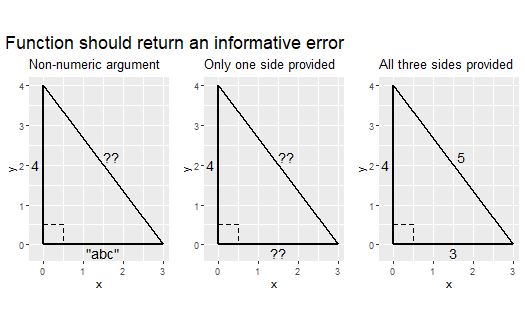
aandb, orbandc, oraandc - if the user only provides the length of one side, the function should throw an error with stop(), see here
- if the user provides the lengths of all three sides, the function should throw an error with stop()
- if the user provides any values other than numeric values, the function should throw an error with stop()
- perform the calculations applying the Pythagorean Theorem
- call the function with a few examples, include also examples in which the function should throw an error
Your function should be able to correctly handle the examples below:

 <!–
<!–
```
## Warning: Using `size` aesthetic for lines was deprecated in ggplot2 3.4.0.
## ℹ Please use `linewidth` instead.
## This warning is displayed once every 8 hours.
## Call `lifecycle::last_lifecycle_warnings()` to see where this warning was
## generated.
```


```
## Warning in grid.Call(C_stringMetric, as.graphicsAnnot(x$label)): no font could
## be found for family "Roboto Condensed"
## Warning in grid.Call(C_stringMetric, as.graphicsAnnot(x$label)): no font could
## be found for family "Roboto Condensed"
## Warning in grid.Call(C_stringMetric, as.graphicsAnnot(x$label)): no font could
## be found for family "Roboto Condensed"
## Warning in grid.Call(C_stringMetric, as.graphicsAnnot(x$label)): no font could
## be found for family "Roboto Condensed"
## Warning in grid.Call(C_stringMetric, as.graphicsAnnot(x$label)): no font could
## be found for family "Roboto Condensed"
## Warning in grid.Call(C_stringMetric, as.graphicsAnnot(x$label)): no font could
## be found for family "Roboto Condensed"
## Warning in grid.Call(C_stringMetric, as.graphicsAnnot(x$label)): no font could
## be found for family "Roboto Condensed"
## Warning in grid.Call(C_stringMetric, as.graphicsAnnot(x$label)): no font could
## be found for family "Roboto Condensed"
## Warning in grid.Call(C_stringMetric, as.graphicsAnnot(x$label)): no font could
## be found for family "Roboto Condensed"
## Warning in grid.Call(C_stringMetric, as.graphicsAnnot(x$label)): no font could
## be found for family "Roboto Condensed"
## Warning in grid.Call(C_stringMetric, as.graphicsAnnot(x$label)): no font could
## be found for family "Roboto Condensed"
## Warning in grid.Call(C_stringMetric, as.graphicsAnnot(x$label)): no font could
## be found for family "Roboto Condensed"
## Warning in grid.Call(C_stringMetric, as.graphicsAnnot(x$label)): no font could
## be found for family "Roboto Condensed"
## Warning in grid.Call(C_stringMetric, as.graphicsAnnot(x$label)): no font could
## be found for family "Roboto Condensed"
```

```
## Warning in grid.Call(C_textBounds, as.graphicsAnnot(x$label), x$x, x$y, : no
## font could be found for family "Roboto Condensed"
```

```
## Warning in grid.Call.graphics(C_text, as.graphicsAnnot(x$label), x$x, x$y, : no
## font could be found for family "Roboto Condensed"
## Warning in grid.Call.graphics(C_text, as.graphicsAnnot(x$label), x$x, x$y, : no
## font could be found for family "Roboto Condensed"
## Warning in grid.Call.graphics(C_text, as.graphicsAnnot(x$label), x$x, x$y, : no
## font could be found for family "Roboto Condensed"
```

<img src="index_files/figure-markdown_strict/unnamed-chunk-5-1.png" alt="Correct use cases of the function."  />


```
## Warning in grid.Call(C_textBounds, as.graphicsAnnot(x$label), x$x, x$y, : no
## font could be found for family "Roboto Condensed"
## Warning in grid.Call(C_textBounds, as.graphicsAnnot(x$label), x$x, x$y, : no
## font could be found for family "Roboto Condensed"
```

```
## Warning in grid.Call.graphics(C_text, as.graphicsAnnot(x$label), x$x, x$y, : no
## font could be found for family "Roboto Condensed"
## Warning in grid.Call.graphics(C_text, as.graphicsAnnot(x$label), x$x, x$y, : no
## font could be found for family "Roboto Condensed"
## Warning in grid.Call.graphics(C_text, as.graphicsAnnot(x$label), x$x, x$y, : no
## font could be found for family "Roboto Condensed"
```

<img src="index_files/figure-markdown_strict/unnamed-chunk-6-1.png" alt="Incorrect use cases of the function."  />
–>
Submit the assignment
To submit the assignment, simply push to your repository the last version of your assignment before the deadline.
Then copy your repository URL (e.g.,
https://github.com/css-fall22/hw4-brinasab) and submit it to Canvas
under HW04 before the deadline.
Make sure to stage-commit-push:
programming_exercises.Rmd(the main file you will add your code to)programming_exercises.md(you will generate this file from the .Rmd by simply knitting it)
Rubric
Needs improvement: Doesn’t complete all components. Code contain errors and/or is not clearly written and/or not documented. Uses the same type of plot for each graph, or doesn’t use plots appropriate for the variables being analyzed. No record of commits other than the final push to GitHub.
Satisfactory: Solid effort. Hits all the elements. Finished all components of the assignment with only minor deficiencies. Easy to follow (both the code and the output).
Excellent: Finished all components of the assignment correctly and used efficient code to complete the exercises. Code is well-documented (both self-documented and with additional comments as necessary). Functions are written succinctly and comprehensibly. Use multiple commits to back up and show a progression in the work.
For further details, see the general rubric we adopt for grading.