class: center, middle, inverse, title-slide .title[ # Layers and EDA ] .author[ ### MACSS 30500 <br /> University of Chicago ] --- class: inverse # Agenda: * Layers: understanding ggplot * [revisit prior slides if needed!](https://cfss-macss.netlify.app/slides/12-visualizations-and-the-grammar-of-graphics/#1) * Intro to Viz * aesthetics (aes) * geometric objects (geoms) * facets * stats transformations * position adjustments * coordinate systems * layer cake approach! * Intro to EDA! --- class: center, middle, inverse # Plotting basics: Layering our cake --- ## aesthetics (aes) Aesthetic mappings are part of our fundamental layer of our plots! They tell us the THING that is going to be mapped from our DATA. Anything that goes inside `aes()` will vary based on the data. If we put something in our ggplot layer (or geom) that is OUTSIDE the `aes()` argument, it will be constant (NOT vary). --- ### aes examples: .panelset[ .panel[.panel-name[Opt 1] .pull-left[ ``` r ggplot(mpg, aes(x = displ, y = hwy, shape = class)) + geom_point() ``` ``` ## Warning: The shape palette can deal with a maximum of 6 discrete values because more ## than 6 becomes difficult to discriminate ## ℹ you have requested 7 values. Consider specifying shapes manually if you need ## that many of them. ``` ``` ## Warning: Removed 62 rows containing missing values or values outside the scale range ## (`geom_point()`). ``` ] .pull-right[  ]] .panel[.panel-name[Opt 2] .pull-left[ ``` r ggplot(mpg) + geom_point(aes(x = displ, y = hwy, shape = class)) ``` ``` ## Warning: The shape palette can deal with a maximum of 6 discrete values because more ## than 6 becomes difficult to discriminate ## ℹ you have requested 7 values. Consider specifying shapes manually if you need ## that many of them. ``` ``` ## Warning: Removed 62 rows containing missing values or values outside the scale range ## (`geom_point()`). ``` ] .pull-right[  ] ] .panel[.panel-name[Opt 3] .pull-left[ ``` r ggplot(mpg) + geom_point(aes(x = displ, y = hwy), shape = 4) ``` ] .pull-right[  ] ] ] --- ### Additional aesthetics: * Color (by variable or setting) * Transparency/opacity (by variable or setting) * Size (by variable or setting) * Shape (by variable or setting) --- ## geometric objects (geoms) Geoms are the way we represent our data -- specifically, how it is that we want to add/represent our data layer * Points * Lines * Density * Bar (and column!) * Boxplot --- ### geoms: examples .panelset[ .panel[.panel-name[Opt 1] .pull-left[ ``` r ggplot(mpg, aes(x = hwy)) + geom_histogram(binwidth = 2) ``` ] .pull-right[  ]] .panel[.panel-name[Opt 2] .pull-left[ ``` r ggplot(mpg, aes(x = hwy)) + geom_density() ``` ] .pull-right[  ] ] .panel[.panel-name[Opt 3] .pull-left[ ``` r ggplot(mpg, aes(x = hwy)) + geom_boxplot() ``` ] .pull-right[  ] ] ] --- ## facets We use facets to separate plots in a meaningful way -- for example, if we want to do some sort of categorical breakout. The main options are - No facets (default and what we've been working with) - `facet_wrap`: think of this as breaking out by one categorical variable and setting how many sub-plots per row - `facet_grid`: more sophsiticated and allows breakouts by TWO (or more) variables --- ### facet examples .panelset[ .panel[.panel-name[Base level] .pull-left[ ``` r ggplot(mpg, aes(x = hwy)) + geom_histogram(binwidth = 2) ``` ] .pull-right[  ]] .panel[.panel-name[Wrap] .pull-left[ ``` r ggplot(mpg, aes(x = hwy)) + geom_histogram(binwidth = 2) + facet_wrap(vars(cyl)) ``` ] .pull-right[  ] ] .panel[.panel-name[Grid A] .pull-left[ ``` r ggplot(mpg, aes(x = hwy)) + geom_histogram(binwidth = 2) + facet_grid(~cyl) ``` ] .pull-right[  ] ] .panel[.panel-name[Grid B] .pull-left[ ``` r ggplot(mpg, aes(x = hwy)) + geom_histogram(binwidth = 2) + facet_grid(drv~cyl) ``` ] .pull-right[  ] ] ] --- ## stats transformations You can conduct additional calculations on data to display summary statistics. You can either calculate this yourself OR you can do calculations on the data during plotting. (it depends on if/whether you need the results) * `stat = identity` (inside `geom_bar`) * `after_stat` [see more here!](https://ggplot2.tidyverse.org/reference/aes_eval.html) * `stat_summary` (I use this the most!) --- ## Transformation examples .panelset[ .panel[.panel-name[Bar count] .pull-left[ ``` r ggplot(mpg, aes(x = hwy)) + geom_bar(stat = 'count' ) ``` ] .pull-right[  ]] .panel[.panel-name[Bar identity] .pull-left[ ``` r ggplot(mpg, aes(x = hwy, y = cty)) + geom_bar(stat = 'identity' ) ``` ] .pull-right[  ] ] .panel[.panel-name[After Stat] .pull-left[ ``` r ggplot(mpg, aes(x = hwy, y = after_stat(prop))) + geom_bar() ``` ] .pull-right[  ] ] .panel[.panel-name[Stat Sum] .pull-left[ ``` r ggplot(mpg) + stat_summary( aes(x = hwy, y = cty), fun.min = min, fun.max = max, fun = median ) ``` ] .pull-right[  ] ] ] --- ## position adjustments Position has to do with the placment of bars: next to, stacked, or scaled to fill to a certain height. *Note: there is position = "fill" and fill = `var` that are different!* * `position = "stack"` * `position = "dodge"` * `position = "fill"` --- ### Position examples: .panelset[ .panel[.panel-name[Bar] .pull-left[ ``` r ggplot(mpg, aes(x = drv, fill = class)) + geom_bar() ``` ] .pull-right[  ]] .panel[.panel-name[Stack] .pull-left[ ``` r ggplot(mpg, aes(x = drv, fill = class)) + geom_bar(position = "stack") ``` ] .pull-right[  ] ] .panel[.panel-name[Dodge] .pull-left[ ``` r ggplot(mpg, aes(x = drv, fill = class)) + geom_bar(position = "dodge") ``` ] .pull-right[  ] ] .panel[.panel-name[Fill] .pull-left[ ``` r ggplot(mpg, aes(x = drv, fill = class)) + geom_bar(position = "fill") ``` ] .pull-right[  ] ] ] --- ## coordinate systems We're not going to get into this too much for now, know that you can map things and use polar coordinates. If it becomes relevant for your project, we can talk more and/or you can take Data Viz! --- ## Recap: * Different layers to our cake -- start with ggplot and build from there: * aesthetics (aes) * geometric objects (geoms) * facets * stats transformations * position adjustments --- class: inverse, center, middle, # Exploratory Data Analysis --- ## Definition of Exploratory Data Analysis (EDA) **All of these can be part of initial investigations in order to get a sense of your data and generate questions**: + discovering patterns + spot anomalies (outliers) + formulate and refine questions + check initial hypotheses before formally testing them -- Exploratory Data Analysis (EDA): * relies on **visualizations** and frequently goes together with **descriptive statistics** * is different from **Explanatory or Confirmatory Data Analysis** --- ## Exploratory Data Analysis as iterative cycle Chapter 10 of R for Data Science defines EDA as an iterative process: 1. Generate questions about your data 1. Search for answers in the data by transforming, visualizing, and modeling the data 1. Use what you learn to refine your questions and/or generate new questions 1. Repeat until necessary -- EDA is a **creative process**: it is not an exact science. It requires knowledge of your data and a lot of time. At the most basic level, it involves answering two questions: 1. What type of **variation** occurs within my variables? 2. What type of **covariation** occurs between my variables? --- ## How to perform Exploratory Data Analysis? EDA relies on: - **descriptive stats** such as measures of central tendency (mean, mode, median) and of dispersion (variance, standard deviation) - **visualization tools** such box plots, histograms, bar charts, and scatter plots -- We focus on visualizations, and especially on: - *Variation* that is how values within a single variable vary (univariate analysis) - *Covariation* that how values of two variables co-vary (bivariate analysis) -- > Visualizations are employed in both Exploratory and Confirmatory Data Analysis, but their use is different. <!-- In Exploratory Analysis you might generate 100 or even 1000 graphs, but not all of them will be useful for your research. In Confirmatory Analysis, you generate only a few graphs and each graph is well refined. --> --- class: inverse, middle # Exploratory VS Confirmatory Data Analysis --- ## Comparing Exploratory and Confirmatory plots ``` r library(palmerpenguins) data("penguins") head(penguins) ``` ``` ## # A tibble: 6 × 8 ## species island bill_length_mm bill_depth_mm flipper_length_mm body_mass_g ## <fct> <fct> <dbl> <dbl> <int> <int> ## 1 Adelie Torgersen 39.1 18.7 181 3750 ## 2 Adelie Torgersen 39.5 17.4 186 3800 ## 3 Adelie Torgersen 40.3 18 195 3250 ## 4 Adelie Torgersen NA NA NA NA ## 5 Adelie Torgersen 36.7 19.3 193 3450 ## 6 Adelie Torgersen 39.3 20.6 190 3650 ## # ℹ 2 more variables: sex <fct>, year <int> ``` We want build a plot of two continuous variables: penguins body mass (in grams) and penguins flipper length (in millimeters) --- count: false ## Exploratory plot .panel1-penguins-eda-auto[ ``` r *ggplot( * data = penguins, * mapping = aes( * x = body_mass_g, * y = flipper_length_mm * ) *) ``` ] .panel2-penguins-eda-auto[ <!-- --> ] --- count: false ## Exploratory plot .panel1-penguins-eda-auto[ ``` r ggplot( data = penguins, mapping = aes( x = body_mass_g, y = flipper_length_mm ) ) + * geom_point() ``` ] .panel2-penguins-eda-auto[ ``` ## Warning: Removed 2 rows containing missing values or values outside the scale range ## (`geom_point()`). ``` <!-- --> ] --- count: false ## Exploratory plot .panel1-penguins-eda-auto[ ``` r ggplot( data = penguins, mapping = aes( x = body_mass_g, y = flipper_length_mm ) ) + geom_point() + * geom_smooth() ``` ] .panel2-penguins-eda-auto[ ``` ## Warning: Removed 2 rows containing non-finite outside the scale range ## (`stat_smooth()`). ``` ``` ## Warning: Removed 2 rows containing missing values or values outside the scale range ## (`geom_point()`). ``` <!-- --> ] <style> .panel1-penguins-eda-auto { color: black; width: 38.6060606060606%; hight: 32%; float: left; padding-left: 1%; font-size: 80% } .panel2-penguins-eda-auto { color: black; width: 59.3939393939394%; hight: 32%; float: left; padding-left: 1%; font-size: 80% } .panel3-penguins-eda-auto { color: black; width: NA%; hight: 33%; float: left; padding-left: 1%; font-size: 80% } </style> Simple exploratory plot. What does this graph tell us? -- Pros: minimum code, easy to replicate, good for your internal use Cons: not well refined, not good for publication or external audience How can we improve this graph? --- count: false ## Confirmatory plot .panel1-penguins-final-auto[ ``` r *ggplot( * data = penguins, * mapping = aes( * x = body_mass_g, * y = flipper_length_mm * ) *) ``` ] .panel2-penguins-final-auto[ <!-- --> ] --- count: false ## Confirmatory plot .panel1-penguins-final-auto[ ``` r ggplot( data = penguins, mapping = aes( x = body_mass_g, y = flipper_length_mm ) ) + * geom_point(alpha = .1) ``` ] .panel2-penguins-final-auto[ ``` ## Warning: Removed 2 rows containing missing values or values outside the scale range ## (`geom_point()`). ``` <!-- --> ] --- count: false ## Confirmatory plot .panel1-penguins-final-auto[ ``` r ggplot( data = penguins, mapping = aes( x = body_mass_g, y = flipper_length_mm ) ) + geom_point(alpha = .1) + * geom_smooth(se = FALSE) ``` ] .panel2-penguins-final-auto[ ``` ## Warning: Removed 2 rows containing non-finite outside the scale range ## (`stat_smooth()`). ``` ``` ## Warning: Removed 2 rows containing missing values or values outside the scale range ## (`geom_point()`). ``` <!-- --> ] --- count: false ## Confirmatory plot .panel1-penguins-final-auto[ ``` r ggplot( data = penguins, mapping = aes( x = body_mass_g, y = flipper_length_mm ) ) + geom_point(alpha = .1) + geom_smooth(se = FALSE) + * labs( * title = "Relationship between body mass and\nflipper length of a penguin", * subtitle = "Sample of 344 penguins", * x = "Body mass (g)", * y = "Flipper length (mm)" * ) ``` ] .panel2-penguins-final-auto[ ``` ## Warning: Removed 2 rows containing non-finite outside the scale range ## (`stat_smooth()`). ``` ``` ## Warning: Removed 2 rows containing missing values or values outside the scale range ## (`geom_point()`). ``` <!-- --> ] --- count: false ## Confirmatory plot .panel1-penguins-final-auto[ ``` r ggplot( data = penguins, mapping = aes( x = body_mass_g, y = flipper_length_mm ) ) + geom_point(alpha = .1) + geom_smooth(se = FALSE) + labs( title = "Relationship between body mass and\nflipper length of a penguin", subtitle = "Sample of 344 penguins", x = "Body mass (g)", y = "Flipper length (mm)" ) + * theme_xaringan( * title_font_size = 18, * text_font_size = 16 * ) ``` ] .panel2-penguins-final-auto[ ``` ## Warning: Removed 2 rows containing non-finite outside the scale range ## (`stat_smooth()`). ``` ``` ## Warning: Removed 2 rows containing missing values or values outside the scale range ## (`geom_point()`). ``` <!-- --> ] <style> .panel1-penguins-final-auto { color: black; width: 38.6060606060606%; hight: 32%; float: left; padding-left: 1%; font-size: 80% } .panel2-penguins-final-auto { color: black; width: 59.3939393939394%; hight: 32%; float: left; padding-left: 1%; font-size: 80% } .panel3-penguins-final-auto { color: black; width: NA%; hight: 33%; float: left; padding-left: 1%; font-size: 80% } </style> Plot for confirmatory purposes. It requires more code. Good for a final report, class presentation, paper, etc. but not necessary for exploratory purposes. --- class: inverse, middle # EDA with the `scorecard` dataset ### Data on every four-year college university in the U.S. The Department of Education collects annual statistics on colleges and universities in the United States. We are going to look at a subset of this data from 2018-19. --- ## `scorecard` ``` r library(c3s2) data("scorecard") glimpse(scorecard) ``` ``` ## Rows: 1,719 ## Columns: 14 ## $ unitid <dbl> 100654, 100663, 100706, 100724, 100751, 100830, 100858, 1009… ## $ name <chr> "Alabama A & M University", "University of Alabama at Birmin… ## $ state <chr> "AL", "AL", "AL", "AL", "AL", "AL", "AL", "AL", "AL", "AL", … ## $ type <fct> "Public", "Public", "Public", "Public", "Public", "Public", … ## $ admrate <dbl> 0.7160, 0.8854, 0.7367, 0.9799, 0.7890, 0.9680, 0.7118, 0.65… ## $ satavg <dbl> 954, 1266, 1300, 955, 1244, 1069, NA, 1214, 1042, NA, 1111, … ## $ cost <dbl> 21924, 26248, 24869, 21938, 31050, 20621, 32678, 33920, 3645… ## $ netcost <dbl> 13057, 16585, 17250, 13593, 21534, 13689, 23258, 21098, 2037… ## $ avgfacsal <dbl> 79011, 104310, 88380, 69309, 94581, 70965, 99837, 68724, 564… ## $ pctpell <dbl> 0.6853, 0.3253, 0.2377, 0.7205, 0.1712, 0.4821, 0.1301, 0.21… ## $ comprate <dbl> 0.2807, 0.6245, 0.6072, 0.2843, 0.7223, 0.3569, 0.8088, 0.69… ## $ firstgen <dbl> 0.3658281, 0.3412237, 0.3101322, 0.3434343, 0.2257127, 0.381… ## $ debt <dbl> 16600, 15832, 13905, 17500, 17986, 13119, 17750, 16000, 1500… ## $ locale <fct> City, City, City, City, City, City, City, City, City, Suburb… ``` --- ## Types of visualization we can perform: #### *Variation* -- how values within a single variable vary (univariate analysis) * continuous variable: histogram * categorical variable: bar chart #### *Covariation* -- how values of two variables co-vary (bivariate analysis) * continuous variables: scatter plot * categorical variables: compute count for each, then visualize * categorical and continuous variables: box plot --- class: inverse, middle # Variation: univariate analysis --- count: false ## Histogram .panel1-histogram-auto[ ``` r *ggplot( * data = scorecard, * mapping = aes(x = cost) *) ``` ] .panel2-histogram-auto[ <!-- --> ] --- count: false ## Histogram .panel1-histogram-auto[ ``` r ggplot( data = scorecard, mapping = aes(x = cost) ) + * geom_histogram() ``` ] .panel2-histogram-auto[ ``` ## Warning: Removed 55 rows containing non-finite outside the scale range ## (`stat_bin()`). ``` <!-- --> ] <style> .panel1-histogram-auto { color: black; width: 38.6060606060606%; hight: 32%; float: left; padding-left: 1%; font-size: 80% } .panel2-histogram-auto { color: black; width: 59.3939393939394%; hight: 32%; float: left; padding-left: 1%; font-size: 80% } .panel3-histogram-auto { color: black; width: NA%; hight: 33%; float: left; padding-left: 1%; font-size: 80% } </style> HISTOGRAM: for **continuous variables** (here cost). It splits the input variable into n sets of equal width and does a frequency count within each set. -- What does this histogram tell us? -- Follow up questions we might ask: Why do we have these different picks? Who are the outliers? --- count: false ## Histogram .panel1-histogram-bins-rotate[ ``` r ggplot( data = scorecard, mapping = aes(x = cost) ) + * geom_histogram(bins = 50) ``` ] .panel2-histogram-bins-rotate[ ``` ## Warning: Removed 55 rows containing non-finite outside the scale range ## (`stat_bin()`). ``` <!-- --> ] --- count: false ## Histogram .panel1-histogram-bins-rotate[ ``` r ggplot( data = scorecard, mapping = aes(x = cost) ) + * geom_histogram(bins = 30) ``` ] .panel2-histogram-bins-rotate[ ``` ## Warning: Removed 55 rows containing non-finite outside the scale range ## (`stat_bin()`). ``` <!-- --> ] --- count: false ## Histogram .panel1-histogram-bins-rotate[ ``` r ggplot( data = scorecard, mapping = aes(x = cost) ) + * geom_histogram(bins = 10) ``` ] .panel2-histogram-bins-rotate[ ``` ## Warning: Removed 55 rows containing non-finite outside the scale range ## (`stat_bin()`). ``` <!-- --> ] <style> .panel1-histogram-bins-rotate { color: black; width: 38.6060606060606%; hight: 32%; float: left; padding-left: 1%; font-size: 80% } .panel2-histogram-bins-rotate { color: black; width: 59.3939393939394%; hight: 32%; float: left; padding-left: 1%; font-size: 80% } .panel3-histogram-bins-rotate { color: black; width: NA%; hight: 33%; float: left; padding-left: 1%; font-size: 80% } </style> Bins: each bar is a bin and represents one interval or set of data; `bins` control the size of each bar. In these examples, we divided the data into 50, 30 (default), or 10 equally sized bars. --- count: false ## Bar chart .panel1-barplot-auto[ ``` r *ggplot( * data = scorecard, * mapping = aes(x = type) *) ``` ] .panel2-barplot-auto[ <!-- --> ] --- count: false ## Bar chart .panel1-barplot-auto[ ``` r ggplot( data = scorecard, mapping = aes(x = type) ) + * geom_bar() ``` ] .panel2-barplot-auto[ <!-- --> ] <style> .panel1-barplot-auto { color: black; width: 38.6060606060606%; hight: 32%; float: left; padding-left: 1%; font-size: 80% } .panel2-barplot-auto { color: black; width: 59.3939393939394%; hight: 32%; float: left; padding-left: 1%; font-size: 80% } .panel3-barplot-auto { color: black; width: NA%; hight: 33%; float: left; padding-left: 1%; font-size: 80% } </style> BAR CHART: for **categorical variables** (here type). It takes each category of the variable and automatically applies a frequency count to aggregate the data by variable. --- ## Bar chart The default stats for `geom_bar()` is `count`. See [documentation](https://ggplot2.tidyverse.org/reference/geom_bar.html) for more info. It means that under the hood `geom_bar()` performs the equivalent of the following: ``` r scorecard %>% count(type) ``` ``` ## # A tibble: 3 × 2 ## type n ## <fct> <int> ## 1 Public 531 ## 2 Private, nonprofit 1104 ## 3 Private, for-profit 84 ``` Unless we explicitly tell `geom_bar()` not to do so with `geom_bar(stats = "identity")` --- ## Reorder factor levels in a bar chart .panelset[ .panel[.panel-name[Not Ordered] <!-- --> ] .panel[.panel-name[Ordered] <!-- --> ] ] --- ## Reorder factor levels in a bar chart The most straightforward approach to reorder the levels of a categorical variables is with dplyr and ggplot combined: ``` # calculate count for variable of interest and save in new dataframe count_type <- scorecard %>% count(type) # use the new dataframe to create the graph ggplot(count_type, mapping = aes(x = reorder(type, desc(n)), y = n)) + geom_bar(stat = "identity") ``` -- ``` # same results in one step scorecard %>% count(type) %>% ggplot(mapping = aes(x = reorder(type, desc(n)), y = n)) + geom_bar(stat = "identity") ``` --- ## Reorder factor levels in a bar chart [`fct_relevel()`](https://forcats.tidyverse.org/reference/fct_relevel.html): allows to reorder factor levels by hand ``` scorecard %>% mutate( type = fct_relevel(.f = type, levels = "Private, nonprofit", "Public", "Private, for-profit" )) %>% ggplot( mapping = aes(x = type)) + geom_bar() ``` [`fct_infreq()`](https://forcats.tidyverse.org/reference/fct_inorder.html): reorders factor levels by the number of obs. with each level (e.g., by frequency) ``` scorecard %>% mutate(type = fct_infreq(type)) %>% ggplot( mapping = aes(x = type)) + geom_bar() ``` --- ## Other types of univariate and bivariate graphs See the Visualization cheat sheet! Help > Cheat Sheets > Data Visualization with ggplot2 --- class: inverse, middle # Covariation: bivariate analysis --- ## Covariation 1. Two-dimensional graphs 1. Multiple window plots 1. Utilizing additional channels --- count: false ## Box plot .panel1-boxplot-auto[ ``` r *ggplot( * data = scorecard, * mapping = aes( * x = type, * y = cost * ) *) ``` ] .panel2-boxplot-auto[ <!-- --> ] --- count: false ## Box plot .panel1-boxplot-auto[ ``` r ggplot( data = scorecard, mapping = aes( x = type, y = cost ) ) + * geom_boxplot() ``` ] .panel2-boxplot-auto[ ``` ## Warning: Removed 55 rows containing non-finite outside the scale range ## (`stat_boxplot()`). ``` <!-- --> ] <style> .panel1-boxplot-auto { color: black; width: 38.6060606060606%; hight: 32%; float: left; padding-left: 1%; font-size: 80% } .panel2-boxplot-auto { color: black; width: 59.3939393939394%; hight: 32%; float: left; padding-left: 1%; font-size: 80% } .panel3-boxplot-auto { color: black; width: NA%; hight: 33%; float: left; padding-left: 1%; font-size: 80% } </style> BOX PLOT: looks at the relationship between a **continuous variable** (here cost) and a **categorical variable** (here type). It summarizes the continuous variable distribution across each of the categorical variables. -- What does this box plot tell us? <!-- median is the line in the middle, the middle value Here we see that on average, public universities are the least expensive, followed by private for-profit institutions. I was somewhat surprised by this since for-profit institutions by definition seek to generate a profit, so wouldn't they be the most expensive? But perhaps this makes sense, because they have to attract students so need to offer a better financial value than competing nonprofit or public institutions. Is there a better explanation for these differences? Another question you could explore after viewing this visualization. --> --- ## Box plot 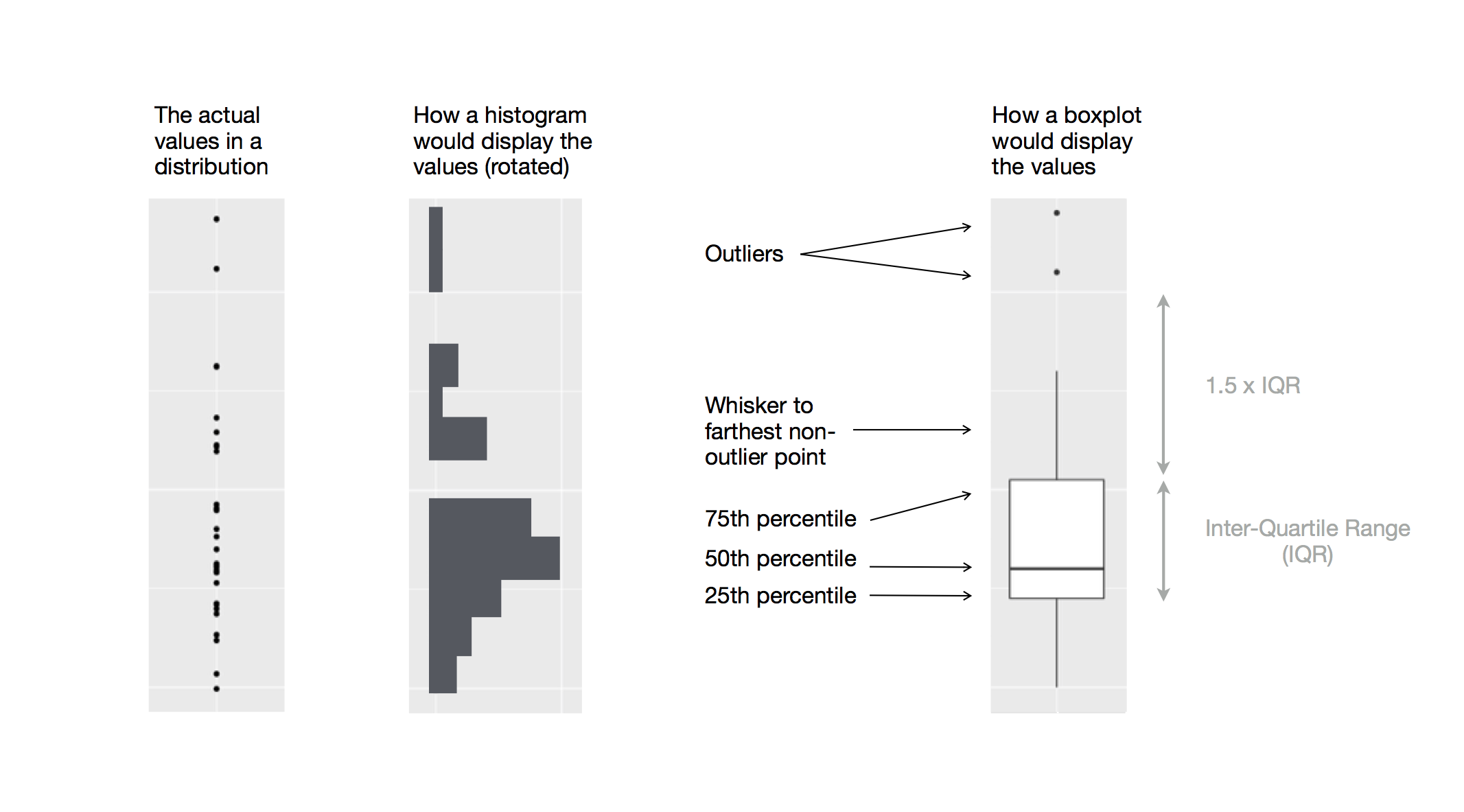<!-- --> .footnote[Source of image: R for Data Science Chapter 7] --- count: false ## Scatterplot .panel1-scatterplot-auto[ ``` r *ggplot( * data = scorecard, * mapping = aes( * x = cost, * y = netcost * ) *) ``` ] .panel2-scatterplot-auto[ <!-- --> ] --- count: false ## Scatterplot .panel1-scatterplot-auto[ ``` r ggplot( data = scorecard, mapping = aes( x = cost, y = netcost ) ) + * geom_point() ``` ] .panel2-scatterplot-auto[ ``` ## Warning: Removed 55 rows containing missing values or values outside the scale range ## (`geom_point()`). ``` <!-- --> ] <style> .panel1-scatterplot-auto { color: black; width: 38.6060606060606%; hight: 32%; float: left; padding-left: 1%; font-size: 80% } .panel2-scatterplot-auto { color: black; width: 59.3939393939394%; hight: 32%; float: left; padding-left: 1%; font-size: 80% } .panel3-scatterplot-auto { color: black; width: NA%; hight: 33%; float: left; padding-left: 1%; font-size: 80% } </style> SCATTERPLOT: looks at the relationship between two **continuous variables** (here cost and netcost). -- What does this scatterplot tell us? <!-- As the advertised price increases, the net cost also increases though with significant variation. Some schools have a much lower net cost than their advertised price. No clear alignment on diagonal, net costs tend to be lower than adv costs for several schools, especially as the adv costs increase; in most universities the average student pay less than the adv costs. It is a 2d plot bcs we are mapping two variables: one on the y and one on the x. Link to next slide: for histogram does not make sense to map a second variable on the y, beside count/frequency bcs with a histogram see the total distribution (vs box plot in which you see summary stats of the distribution). --> --- count: false ## Multiple windows plot - faceted histogram .panel1-histogram-facet-user[ ``` r *ggplot( * data = scorecard, * mapping = aes(x = cost) *) + * geom_histogram() ``` ] .panel2-histogram-facet-user[ ``` ## Warning: Removed 55 rows containing non-finite outside the scale range ## (`stat_bin()`). ``` <!-- --> ] --- count: false ## Multiple windows plot - faceted histogram .panel1-histogram-facet-user[ ``` r ggplot( data = scorecard, mapping = aes(x = cost) ) + geom_histogram() + * facet_wrap(facets = vars(type)) ``` ] .panel2-histogram-facet-user[ ``` ## Warning: Removed 55 rows containing non-finite outside the scale range ## (`stat_bin()`). ``` <!-- --> ] <style> .panel1-histogram-facet-user { color: black; width: 38.6060606060606%; hight: 32%; float: left; padding-left: 1%; font-size: 80% } .panel2-histogram-facet-user { color: black; width: 59.3939393939394%; hight: 32%; float: left; padding-left: 1%; font-size: 80% } .panel3-histogram-facet-user { color: black; width: NA%; hight: 33%; float: left; padding-left: 1%; font-size: 80% } </style> Multiple windows plot - HISTOGRAM WITH FACETS: looks at **categorical variables**. On the y axis is frequency count (calculated from the x). With histograms we cannot map a second variable on the y, but we can use facets to compare the distribution of each college type. Compare with box plot. --- count: false ## Multiple windows plot - faceted scatterplot .panel1-scatterplot-facet-user[ ``` r *ggplot( * data = scorecard, * mapping = aes( * x = cost, * y = netcost * ) *) + * geom_point() ``` ] .panel2-scatterplot-facet-user[ ``` ## Warning: Removed 55 rows containing missing values or values outside the scale range ## (`geom_point()`). ``` <!-- --> ] --- count: false ## Multiple windows plot - faceted scatterplot .panel1-scatterplot-facet-user[ ``` r ggplot( data = scorecard, mapping = aes( x = cost, y = netcost ) ) + geom_point() + * facet_wrap(facets = vars(type)) ``` ] .panel2-scatterplot-facet-user[ ``` ## Warning: Removed 55 rows containing missing values or values outside the scale range ## (`geom_point()`). ``` <!-- --> ] <style> .panel1-scatterplot-facet-user { color: black; width: 38.6060606060606%; hight: 32%; float: left; padding-left: 1%; font-size: 80% } .panel2-scatterplot-facet-user { color: black; width: 59.3939393939394%; hight: 32%; float: left; padding-left: 1%; font-size: 80% } .panel3-scatterplot-facet-user { color: black; width: NA%; hight: 33%; float: left; padding-left: 1%; font-size: 80% } </style> Multiple windows plot - SCATTERPLOT WITH FACETS: looks at **continuous variables** (here cost and netcost) and plot each in a separate panel with same scale range on the x and y. --- count: false ## Utilizing additional aesthetics .panel1-scatterplot-mult-channels-rotate[ ``` r ggplot( data = scorecard, mapping = aes( x = cost, y = netcost, * color = type, ) ) + geom_point() ``` ] .panel2-scatterplot-mult-channels-rotate[ ``` ## Warning: Removed 55 rows containing missing values or values outside the scale range ## (`geom_point()`). ``` <!-- --> ] --- count: false ## Utilizing additional aesthetics .panel1-scatterplot-mult-channels-rotate[ ``` r ggplot( data = scorecard, mapping = aes( x = cost, y = netcost, * color = type, size = debt ) ) + geom_point() ``` ] .panel2-scatterplot-mult-channels-rotate[ ``` ## Warning: Removed 143 rows containing missing values or values outside the scale range ## (`geom_point()`). ``` <!-- --> ] <style> .panel1-scatterplot-mult-channels-rotate { color: black; width: 38.6060606060606%; hight: 32%; float: left; padding-left: 1%; font-size: 60% } .panel2-scatterplot-mult-channels-rotate { color: black; width: 59.3939393939394%; hight: 32%; float: left; padding-left: 1%; font-size: 60% } .panel3-scatterplot-mult-channels-rotate { color: black; width: NA%; hight: 33%; float: left; padding-left: 1%; font-size: 60% } </style> Additional info: rather than using facets to sort each distribution, we could use the color aesthetic to automatically incorporate the `type` info into the same visualization. We can also add a fourth variable such as `depth` and render it through the size aesthetic. However, does adding `depth` make the graph more informative? --- ## Themes ``` r ggplot(data = scorecard, aes( x = cost, y = netcost, color = type )) + geom_point() + scale_color_brewer(palette = "Dark2") ``` <!-- --> [ggplot themes](https://ggplot2.tidyverse.org/reference/ggtheme.html) and [color brewer](https://ggplot2.tidyverse.org/reference/scale_brewer.html), and [colorblind friendly](https://jrnold.github.io/ggthemes/reference/colorblind.html) --- class: inverse, middle # Factors --- Categorical variables, also called discrete variables, are variables that have a fixed set of possible values. R uses **factors** to work these variables. [**Chapter 16 of R for Data Science**](https://r4ds.had.co.nz/factors.html) goes in-depth on creating and modifying factors: ``` r month_string <- c( "Jan", "Feb", "Mar", "Apr", "May", "Jun", "Jul", "Aug", "Sep", "Oct", "Nov", "Dec" ) month_string typeof(month_string) # character class(month_string) # character ``` ``` r month_factor <- factor(month_string, levels = month_string) month_factor typeof(month_factor) # integer class(month_factor) # factor ``` * `class`: attribute of the object, regardless of R internal storage * `typeof`: R internal storage of the object --- class: inverse, middle # Practice exploring data Use `data()` to find a suitable R dataset to explore * make a histogram * make a bar plot with a fill * stack it * dodge it * position = fill it --- ## Acknowledgments The content of these slides is derived in part from Sabrina Nardin and Benjamin Soltoff’s “Computing for the Social Sciences” course materials, licensed under the CC BY NC 4.0 Creative Commons License. Any errors or oversights are mine alone.